How travel support runs on Acai Desk
Riccardo Vittoria
If your helpdesk is anything like the ones we work with, your advisors are having hundreds, maybe thousands, of traveler requests a week. Most of what happens in them lives in an inbox or a generic helpdesk: great at storing conversations, inefficient at everything else.
The problem is well known: travel teams can't see how many cases came in last week, who was drowning, or which type of customer was quietly getting slow answers.
The context lives scattered across tools, and the helpdesk becomes a messaging space instead of a working one. So the average travel advisor spends twenty minutes in the GDS hunting for context just to answer a traveler, not even to resolve the full case.
We've spent years inside travel support desks, at airlines large and small, TMCs, OTAs, and wholesalers, watching complex travel work forced through systems that were never built for it.
So we built Acai Desk to fix it.
Here's what a day on Desk actually looks like, from the advisor's chair and from the manager's.
Your advisors stop searching and start solving
Lets start with the advisors, who are in the queue all day, every day.
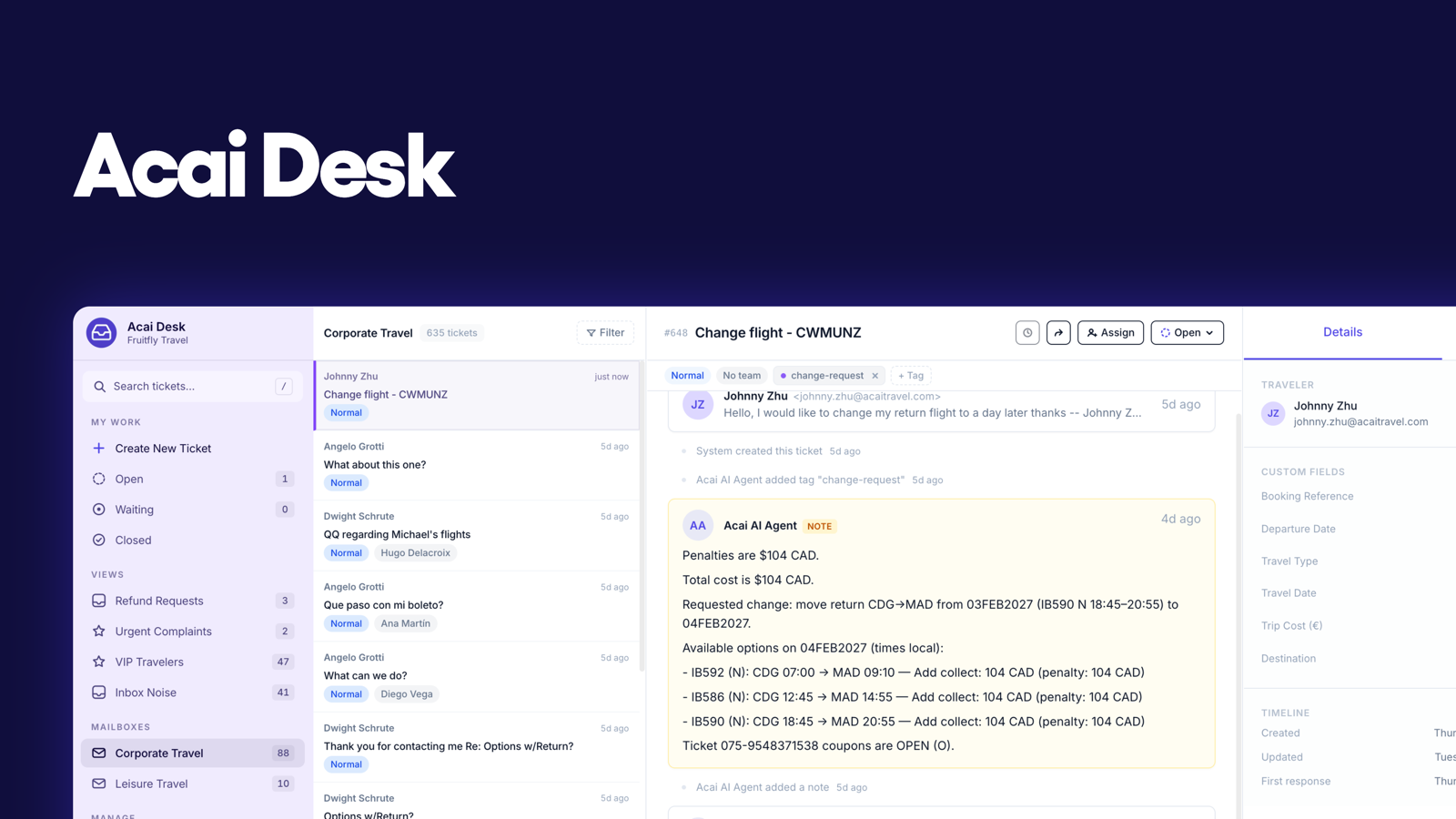
Thanks to the AI Supervisor, the queue arrives already triaged. Every email, WhatsApp message, chatbot reply, and airline notification becomes a case, linked to the right booking and routed to the right person.
Unlike generic tools that route based on keywords, Desk routes on intent, trip type, language, PNR, and urgency, all configured by your team.
A traveler's 3 a.m. airline schedule change and their 9 a.m. "any chance of the earlier flight?" request stay together, tied to the same trip, instead of splitting into two threads across different systems.
Acai Desk is natively connected to the GDS or NDC-content, so every case arrives with the context that matters: traveler, trip, PNR, policies, and conversation history, there before the case is even opened. Nobody re-reads a thread to reconstruct what happened, and nobody opens the GDS just to check what booking this is about.
And because every case has an owner and a status, no traveler receives two answers to the same question, and nothing goes quiet in a personal folder. Any advisor can pick up any request and know exactly where it stands.
Acai Desk organizes itself
Views do a lot of quiet work. Schedule changes, exchanges, ticketing, groups: you set the views you want, so each case type has its own queue, sorted however your desk works.
Not everything deserves a place in the queue. Desk filters the junk, closes the simple requests, and automatically extracts the travel data needed for file finishing, reporting, and SSR remarks, all while keeping your records accurate.
The work that still requires an advisor is routed to the right person. Set your rules once, and requests route automatically by advisor skill, experience, and location. Simpler requests stay with junior teams, and senior expertise is reserved for VIP travelers.
And when things get complex and something needs a manager, it doesn't wait to be noticed. Acai reads sentiment and case context to flag the requests that need attention, before a frustrated traveler becomes a bigger problem.
Automation on your terms
Everything so far happens before anyone even talks about case automation: the triage, the context, the visibility. But on top of Acai Desk, teams can switch on Acai's AI agents, and this is where the day really changes.
Copilot works alongside your advisors. It reads the case, checks the booking and the fare rules, and can draft the reply before the case is even opened. The advisor reviews and sends. It's the twenty minutes of context-hunting, done in seconds.
Autopilot goes further: it owns cases end to end, within the limits you define. You choose which case types it can resolve on its own, which it can only draft, and which always stay with a human.
Either way, your team stays in control. Every action is logged in the system, with a complete audit trail. Nothing goes out that your rules didn't allow, and nothing happens that you can't see afterwards.
Your support operation, finally measurable
You don't need to open every case to know how your operation is performing. With Desk, the whole operation is visible in one place.
Request volume. Response times. Ownership. SLAs. Where work is piling up.
For many teams, it's the first time they can see how their support operation is actually performing. Problems surface while they're still small, a slipping response time is visible today, not in next month's complaint.
The bigger change is what the team learns. Which case types eat the most time, which clients generate the most work, where the routine concentrates, that's exactly the information that tells you what to automate next and what parts of your business need attention.
A helpdesk should save you money not cost it
Hundreds of cases a month can quickly turn into high costs and long days for your team. Acai Desk was built to end that.
As you have seen, the operations that used to run on memory, mailbox folders, or a generic helpdesk now can run on something the whole team can see and benefit from.
Teams on Acai Desk are already cutting manual work by 20% on average but the bigger prize is scale: winning a new account no longer means adding extra headcount.
Ready to see your operations improve? Acai Desk goes live in hours and shows results within the first two weeks.
Book a demo with one of our product specialists to see how it would look for your company.
Want to learn more? Explore more features on the official product page or watch our product tour.
We'd love to hear what you think. If you have feedback, drop us an email at hello@acaitravel.com